Dashboard
Sortie ships a self-contained HTML dashboard at / on the same port as the JSON API and Prometheus metrics. No external tools, no JavaScript frameworks, no CDN dependencies: one HTML page rendered server-side with vanilla JavaScript for interactive behavior.
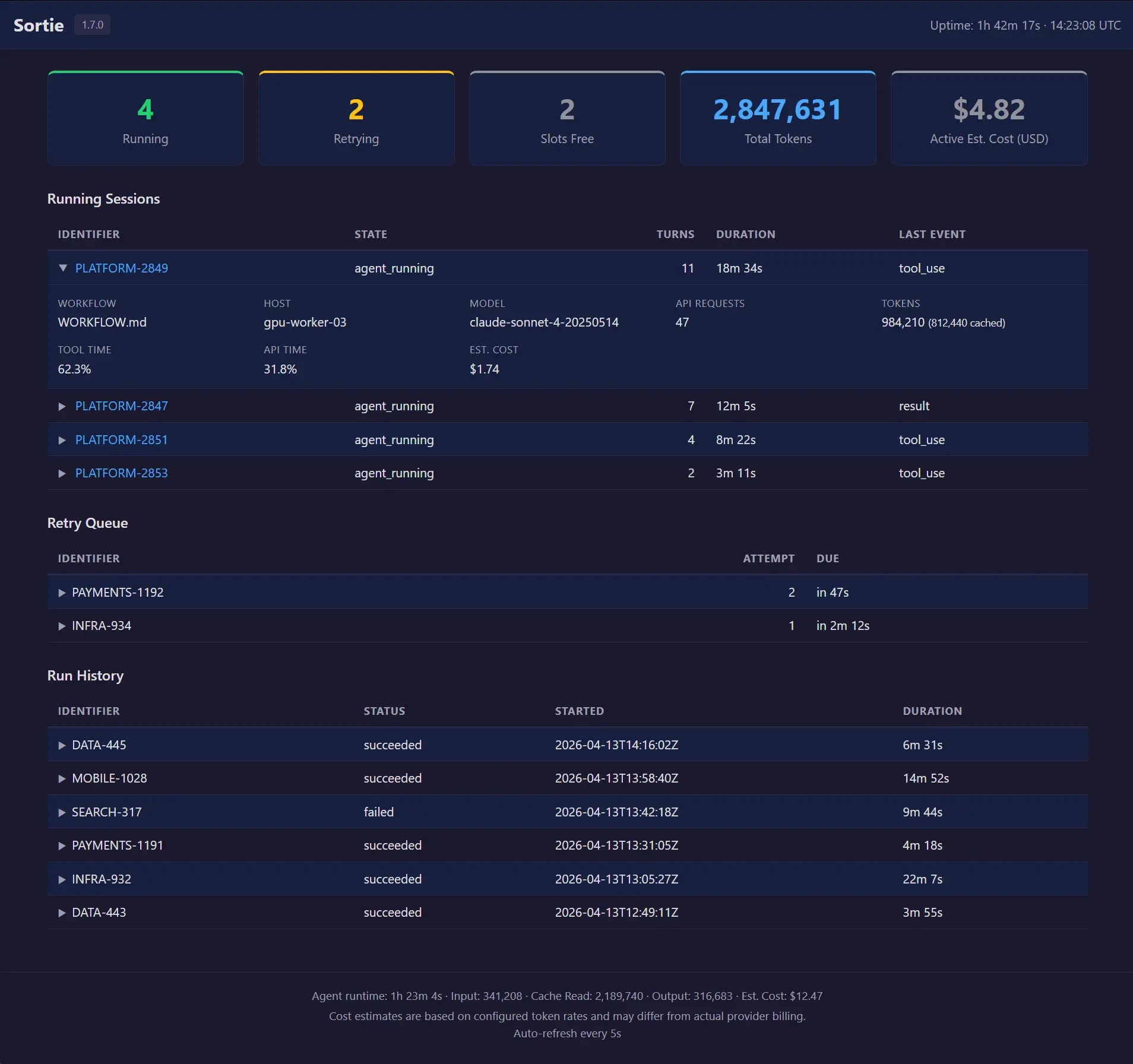
The dashboard is designed for local, at-a-glance monitoring. Open it in a browser while Sortie runs, and you see what is happening right now: which agents are working, how many tokens they have consumed, what is waiting for retry, and how past runs ended. Tables use an accordion pattern: each row shows primary identification and status fields, and clicking a row expands an inline detail panel with secondary fields. All rows are collapsed by default. The page auto-refreshes every 5 seconds via an HTML <meta http-equiv="refresh"> tag.
The dashboard supports light and dark modes automatically via prefers-color-scheme. No toggle is needed.
Accessing the dashboard
The dashboard is available when the HTTP server is running. By default, Sortie starts the server on 127.0.0.1:7678. Open http://127.0.0.1:7678/ in a browser.
Override the port or bind address with CLI flags:
sortie --port 9090 WORKFLOW.mdOr set server.port in the WORKFLOW.md front matter:
---
server:
  port: 9090
---
To disable the server entirely, pass --port 0. For the full server extension schema, see WORKFLOW.md configuration reference.
Network access
Sortie binds to 127.0.0.1 by default. The dashboard is accessible on the machine where Sortie is running, not from other hosts on the network. This is intentional: Sortie is a local orchestration tool, and the dashboard is a local monitoring surface.
--host accepts any IP address; --host 0.0.0.0 listens on all interfaces. Sortie’s HTTP server has no built-in authentication on any interface it binds.
Aggregated, historical, and alertable monitoring is served by the Prometheus /metrics endpoint rather than by this page.
Header
The top bar displays:
| Element | Description |
|---|---|
| Sortie | Application name. |
| Version badge | Build version string. Shows dev when running an untagged build. |
| Uptime | Wall-clock time since the process started, formatted as Xd Xh Xm or Xh Xm Xs. |
| Timestamp | UTC time when the snapshot was generated, in HH:MM:SS UTC format. |
Summary cards
Cards across the top provide the high-level picture. Some appear unconditionally; others appear only when specific config or state applies, as the Condition column below states. For example, one appears when token rates are configured, another when at least one issue is currently held out of dispatch by a budget ceiling.
| Card | Color | Value | Condition | Description |
|---|---|---|---|---|
| Running | Green | Integer | Always | Number of agent sessions currently executing. Maps to sortie_sessions_running in Prometheus. |
| Retrying | Yellow | Integer | Always | Number of issues in the retry queue, waiting for their next attempt after an error, continuation, or stall timeout. Maps to sortie_sessions_retrying. |
| Slots Free | Gray | Integer | Always | Remaining dispatch capacity: max_concurrent_agents − running. When this reaches 0, the orchestrator waits for a running session to finish before dispatching the next issue. |
| Total Tokens | Blue | Integer (comma-formatted) | Always | Cumulative LLM tokens consumed across all sessions since startup: input plus output. Cache-read tokens are a subset of input and are not added on top. Sessions that reported no token usage contribute nothing. |
| Active Est. Cost (USD) | Neutral | USD string | token_rates configured | Estimated cost across currently running sessions, computed from configured per-token rates. Shows an em dash when no running session matches a configured rate. See cost estimation. |
| Budget Blocked | Neutral | Integer | At least one issue budget-exhausted | Number of issues currently held out of dispatch by a per-issue agent.max_sessions or agent.max_tokens ceiling. Maps to sortie_budget_exhausted_issues. See the budget blocked table below. |
Accordion row detail
All three tables (Running Sessions, Retry Queue, Run History) use an accordion pattern. Each data row consists of two HTML <tr> elements: a collapsed header row showing primary fields, and a hidden detail row containing secondary fields in a definition list grid.
Interaction
- Click any row (except links) to toggle its detail panel open or closed.
- Keyboard: focus a row with Tab, then press Enter or Space to toggle.
- Links inside rows (e.g., the Identifier link in Running Sessions) navigate normally. They do not trigger the accordion.
Expand indicator
Each row’s first cell is prefixed with a small triangle (▶) that rotates 90° when the row is expanded. This provides visual affordance that the row is interactive.
State persistence across refresh
The page auto-refreshes every 5 seconds. Expanded rows are remembered across refreshes using the browser’s sessionStorage under the key sortie-expanded. Each row is identified by a stable key derived from its table and identifier (e.g., running:MT-649, retry:MT-649, history:MT-649:2). On page load, previously expanded rows are automatically re-opened. Stale keys for rows that no longer exist are pruned. Closing the browser tab clears the stored state.
Accessibility
| Attribute | Purpose |
|---|---|
aria-expanded | Announces expanded or collapsed state to screen readers. |
aria-controls | Associates the header row with its detail panel by id. |
aria-hidden | Hides the collapsed detail row from assistive technology. |
role="button" | Signals the row is interactive. |
tabindex="0" | Makes the row keyboard-focusable. |
A :focus-visible outline matches the link color. The prefers-reduced-motion media query disables all CSS transitions.
Table striping
Row striping uses a CSS class (row-even) rather than nth-child, because the interleaved detail rows would break CSS child counting.
Running sessions table
Lists every agent session that is actively executing. Sorted by start time (oldest first). Each row links to the per-issue JSON detail endpoint.
Collapsed row columns (always visible)
| Column | Description |
|---|---|
| Identifier | Issue identifier (e.g., MT-649). Clicking the link opens GET /api/v1/{identifier} in the browser. Prefixed with an expand indicator (▶). |
| State | Current orchestrator state for this issue (e.g., agent_running). |
| Turns | Counts every turn this session has begun, self-review turns included. The number moves as soon as a turn opens, not once it finishes, and self-review can push it past agent.max_turns. See turn_count for the full definition. |
| Duration | Wall-clock time since the session started, formatted as Xh Xm Xs or Xm Xs. |
| Last Event | Most recent agent event type received (e.g., result, tool_use). |
Detail panel fields (visible when expanded)
| Field | Description |
|---|---|
| Workflow | Name of the WORKFLOW.md file that dispatched this session. Shows an em dash when unavailable. |
| Host | SSH host where the agent is running. This field appears only when at least one session uses an SSH host. Shows local for sessions running on the same machine as Sortie. |
| Usage reporting | When this session’s token figures arrive and what they attribute to, stated once for the four fields below. Reads figures arrive during each turn or figures arrive when a turn ends, followed by , per model or , as a session total; this session reports no token usage for a kind that produces no figure at all; not declared for a custom adapter that declared neither. The usage reporting table states the value each built-in kind declares. |
| Model | LLM model name reported by the agent. Reads not reported yet when the session attributes figures per model but has not named one, not attributed to a model when its figures are session-level totals, and an em dash when the session reports no usage. |
| API Requests | Number of LLM API requests the agent has made. A count appears when this session’s figures arrive during each turn and either one has already arrived or no turn has begun, so a 0 here is a measurement rather than a blank. When the breakdown names two or more models, the count carries the split in parentheses, ordered by model name: 12 (model-a: 5, model-b: 7). Reads not reported yet when figures arrive during each turn but the session’s first turn has begun with nothing counted, which is what both a session waiting on its first figure and a runtime that declared per-request figures but delivers none look like from the event stream. Reads not measured when figures arrive at turn end instead, because that count settles at most once per turn rather than once per request, and an em dash when the session reports no usage. |
| Tokens | Total tokens consumed by this session. When cache-read tokens are nonzero, they appear in parentheses (e.g., 12,450 (8,200 cached)). Reads not reported yet when the coding agent has reported no token usage so far, which is distinct from a reported 0, and an em dash when the session reports no usage at all. A figure that leaves out the turn still in flight carries the suffix , excludes the turn in progress. |
| Est. Cost | Estimated cost for this session based on configured token rates. Shows an em dash when token_rates is absent, when no rate is configured for this session’s agent adapter kind, when its Tokens field is unmeasured, or when the session reports no usage. Carries the same , excludes the turn in progress suffix as Tokens. |
| Tool Time | Percentage of elapsed wall-clock time the agent spent in tool calls. Shows N/A until the session has both elapsed time and recorded tool time. |
| API Time | Percentage of elapsed wall-clock time the agent spent waiting for LLM API responses. Shows N/A until both elapsed time and API time are recorded. |
Every built-in agent kind declares its usage reporting. A custom adapter that declares neither field leaves its sessions undeclared: Usage reporting reads not declared, Model shows an em dash, API Requests reads not measured, and Tokens carries the suffix , usage reporting not declared.
When no sessions are running, the table is replaced with a centered “No running sessions” message.
Retry queue table
Lists issues that are waiting for their next session attempt. Sorted by due time (soonest first).
Collapsed row columns
| Column | Description |
|---|---|
| Identifier | Issue identifier. Prefixed with an expand indicator (▶). |
| Attempt | The attempt number for the upcoming retry (e.g., 2 means the first attempt failed and this is the second try). |
| Due | Time until the retry fires, relative to the snapshot timestamp. Shows in Xm Xs, now, or overdue. |
Detail panel fields
| Field | Description |
|---|---|
| Error | Error message from the previous failed attempt. Displayed at full width in the detail panel without truncation. |
When no retries are pending, the table is replaced with “No retries pending.”
Budget blocked table
Lists issues currently held out of dispatch by a per-issue agent.max_sessions or agent.max_tokens ceiling. Appears only when at least one issue is held. Unlike the other tables on this page, rows are plain: there is no expand indicator or detail panel.
Columns
| Column | Description |
|---|---|
| Identifier | Issue identifier. Links to the per-issue JSON detail endpoint. |
| Reason | Which ceiling stopped dispatch: “Session budget” or “Token budget”. |
| Used | Usage against the ceiling that fired: completed sessions for a session-budget hold, measured tokens for a token-budget hold. |
| Blocked For | Wall-clock time since the hold began, relative to the snapshot timestamp. |
Run history table
Lists recently completed session attempts, both successful and failed. Shows the last 25 entries. This section appears only when run history data is available (requires persistence to be enabled).
Collapsed row columns
| Column | Description |
|---|---|
| Identifier | Issue identifier. Prefixed with an expand indicator (▶). |
| Status | Terminal outcome of the attempt: succeeded, failed, cancelled, ci_failed, needs_person, or budget_stopped. A budget_stopped attempt is one agent.max_tokens stopped in flight rather than one that ended on its own; the detail panel’s Error field names the tokens used and the ceiling. |
| Started | RFC 3339 timestamp when the session started. |
| Duration | Wall-clock time from start to completion. Computed from the start and completion timestamps. |
Detail panel fields
| Field | Description |
|---|---|
| Attempt | Which attempt number completed (1-based). The first dispatch is 1, the first retry is 2, and so on. |
| Turns | Number of agent turns completed in this session. A turn is one prompt–response cycle. |
| Workflow | WORKFLOW.md file used for this run. Shows an em dash when unavailable. |
| Error | Error message, if the attempt failed. Shows an em dash for successful attempts. Displayed at full width without truncation. |
Footer
The footer combines two kinds of figures. Agent runtime, Input, Cache, and Output are cumulative across every session since Sortie’s database was created, not since the current process started: a restart continues from the last persisted values instead of resetting to zero. Est. Cost, when shown, is computed only from the sessions currently running and is never persisted; see Cost estimation below. Auto-refresh is a page-behavior note, not a statistic.
| Element | Description |
|---|---|
| Agent runtime | Cumulative wall-clock time agents have spent running, formatted as Xh Xm Xs. |
| Input | Total input tokens consumed (comma-formatted). |
| Cache | Total cache-read tokens (comma-formatted). |
| Output | Total output tokens consumed (comma-formatted). |
| Est. Cost | Estimated cost across running sessions. Appears only when token_rates is configured. Shows an em dash when no running session matches a configured rate. |
| Auto-refresh | Reminder that the page refreshes every 5 seconds. |
When token_rates is configured, a disclaimer line appears below the aggregate stats: “Cost estimates are based on configured token rates and may differ from actual provider billing.”
Below that, up to four further lines disclose, by reason, how many sessions the totals above leave out. Each line appears only while its count is above zero:
| Condition | One session | Multiple sessions |
|---|---|---|
| A running session’s agent kind reports usage, but none has arrived yet | “1 running session has not reported token usage yet; the totals above exclude it.” | “N running sessions have not reported token usage yet; the totals above exclude them.” |
| A running session’s agent kind reports no token usage at all | “1 running session runs an agent that reports no token usage; the totals above exclude it.” | “N running sessions run agents that report no token usage; the totals above exclude them.” |
| An already-ended session never reported token usage | “1 session that already ended never reported token usage; the totals above exclude it too.” | “N sessions that already ended never reported token usage; the totals above exclude them too.” |
A running, measured session has no token_rates price for its agent kind | “1 running session is excluded from Est. Cost because token_rates has no price for its agent.” | “N running sessions are excluded from Est. Cost because token_rates has no price for their agents.” |
The last line appears only alongside the Est. Cost card, so only when token_rates is configured. See the state endpoint reference for how each count is scoped in agent_totals.
Cost estimation
The dashboard displays estimated USD cost when token_rates is configured in WORKFLOW.md front matter. Without token_rates, the dashboard shows raw token counts only. No cost figures appear anywhere.
Cost is computed at render time from per-session token counts and the configured rate for each session’s agent adapter kind. No cost data is persisted. The formula for a single session:
The aggregate cost card sums per-session costs across currently running sessions. Historical sessions are excluded.
Each running session’s cost is resolved using the agent adapter kind captured at dispatch time (e.g., claude-code, copilot-cli). When a session’s adapter kind does not match any configured rate, that session contributes no cost and shows an em dash in the detail panel.
Cost values are formatted with two decimal places (e.g., $1.47). Values above $1,000 use comma separators (e.g., $1,234.56). Values below $0.01 show as $0.00.
For token rate configuration syntax, see the token_rates extension reference.
Temporary unavailability
If the orchestrator’s state snapshot fails (e.g., during shutdown), the dashboard returns HTTP 503 with a minimal HTML page that reads “Dashboard temporarily unavailable” and auto-refreshes in 5 seconds. No manual reload is needed.
If template rendering fails (an internal error), the dashboard returns HTTP 500 with a similarly minimal auto-refreshing error page.
Was this page helpful?